

Making Tax Digital for Income Tax Self Assessment, often called MTD for ITSA, changes how sole traders and landlords keep records and report income to HMRC. If you are affected, you need to keep digital records, send quarterly updates and complete your annual tax return using compatible software.
For many business owners, the biggest adjustment is keeping records ready for reporting throughout the year. If you currently gather everything together when your tax return is due, you will need a more regular routine.
At Every Penny Accounts, we help you understand what the changes mean for your circumstances. This guide explains who needs to use MTD, the deadlines to know and how to make the reporting process more manageable.

What Does MTD For ITSA Mean?
Making Tax Digital is HMRC’s programme for moving tax records and reporting into digital systems. Under MTD for Income Tax, your software uses your financial records to prepare regular summaries for HMRC.
The process has three main parts:
- Keeping digital records of your self-employment and property income and expenses.
- Sending quarterly updates through compatible software.
- Checking your figures, making any necessary adjustments and submitting your annual tax return.
Quarterly updates provide information during the year, while the annual return confirms your complete tax position. You still need to account for relevant income, allowances and adjustments before your return is submitted. At Every Penny Accounts, our team can guide you through all you need to know about Making Tax Digital for ITSA.
Who Does MTD For ITSA Affect?
MTD for Income Tax applies to sole traders and landlords registered for Self Assessment whose qualifying income exceeds the relevant threshold, unless an exemption applies.
This includes freelancers, tradespeople and other self-employed individuals, as well as people receiving rental income. You can also be affected if you have a combination of self-employment and property income.
The requirements are being introduced in stages:

The first phase has already started. If your qualifying income exceeded £50,000 in 2024/25 and you are not exempt, you should already be using MTD for Income Tax.
HMRC normally writes to affected taxpayers, but you remain responsible for checking whether you need to join, even if you have not received a letter. You can use HMRC’s eligibility guidance to check your position.
How Is Qualifying Income Calculated?
Qualifying income generally means your combined gross income from self-employment and property before expenses are deducted. It is different from your profit or the amount left after paying business costs.
For example, suppose you received £39,000 from self-employment and £14,000 from renting out a property in 2024/25. Your combined qualifying income would be £53,000, putting you above the April 2026 threshold.
Employment income, pensions and dividends do not count towards this threshold, although they may still need to be included in your annual tax return.
If you jointly own a rental property, your share of its income generally counts towards your qualifying income. There are specific rules where you only receive information about your share after expenses have been deducted.
Checking the correct figures matters. Looking only at your business profit or assessing each income source separately could give you the wrong answer.
Does Being VAT Registered Change The Rules?
Being registered for VAT does not automatically exclude you from MTD for Income Tax.
A sole trader may need to follow both MTD for VAT and MTD for Income Tax. These are separate reporting obligations, so completing digital VAT returns does not replace your Income Tax updates.
Limited companies are outside this Income Tax rollout for their company income. However, a company director could still be affected personally if they also receive qualifying income from a separate sole trade or rental property.
What Digital Records Do You Need To Keep?
You or your accountant need to create and store digital records of your relevant income and expenses. You must also retain the supporting records needed for Self Assessment, such as invoices and bank statements.
A bank feed can help bring transactions into your software, but those transactions still need checking. You may need to add missing information, choose the correct expense category or record transactions that do not appear in the feed.
Using more than one software product can also require digital links between your records and the system used to send updates. Repeatedly copying figures manually between systems may not meet these requirements.
A practical routine could involve setting aside time each week to review transactions, organise receipts and deal with anything you do not recognise. Our bookkeeping support can help you keep that work under control alongside running your business.
What Software Do You Need For MTD?
You need software that works with MTD for Income Tax and supports your circumstances.
Some products handle digital records, quarterly updates and the annual tax return together. Others connect to existing records, such as spreadsheets, and send information to HMRC. This is often called bridging software.
Spreadsheets can therefore remain part of your process, provided they are connected appropriately to compatible software. You do not necessarily need to replace a working system without first checking your options.
Before choosing software, consider:
- Whether it supports self-employment, property income or both.
- Whether it can handle your other income when completing the annual return.
- How it connects with your existing records.
- Which functions are included and what they cost.
- How you and your accountant will work together.
MTD compatibility for VAT alone does not confirm that a product can handle Income Tax reporting. Check the relevant product and subscription rather than relying on the software brand name.
Every Penny Accounts can help you review your options and provide practical accounting software setup support.
How Do Quarterly Updates Work?
Quarterly updates summarise the income and expenses recorded for each self-employment and property business. They are not four separate annual tax returns, and you do not need to make year-end accounting or tax adjustments before sending them.
The updates are cumulative. Each one covers the period from the beginning of the tax year to the relevant reporting date, rather than only the latest three months.
For the 2026/27 tax year, standard update periods are:
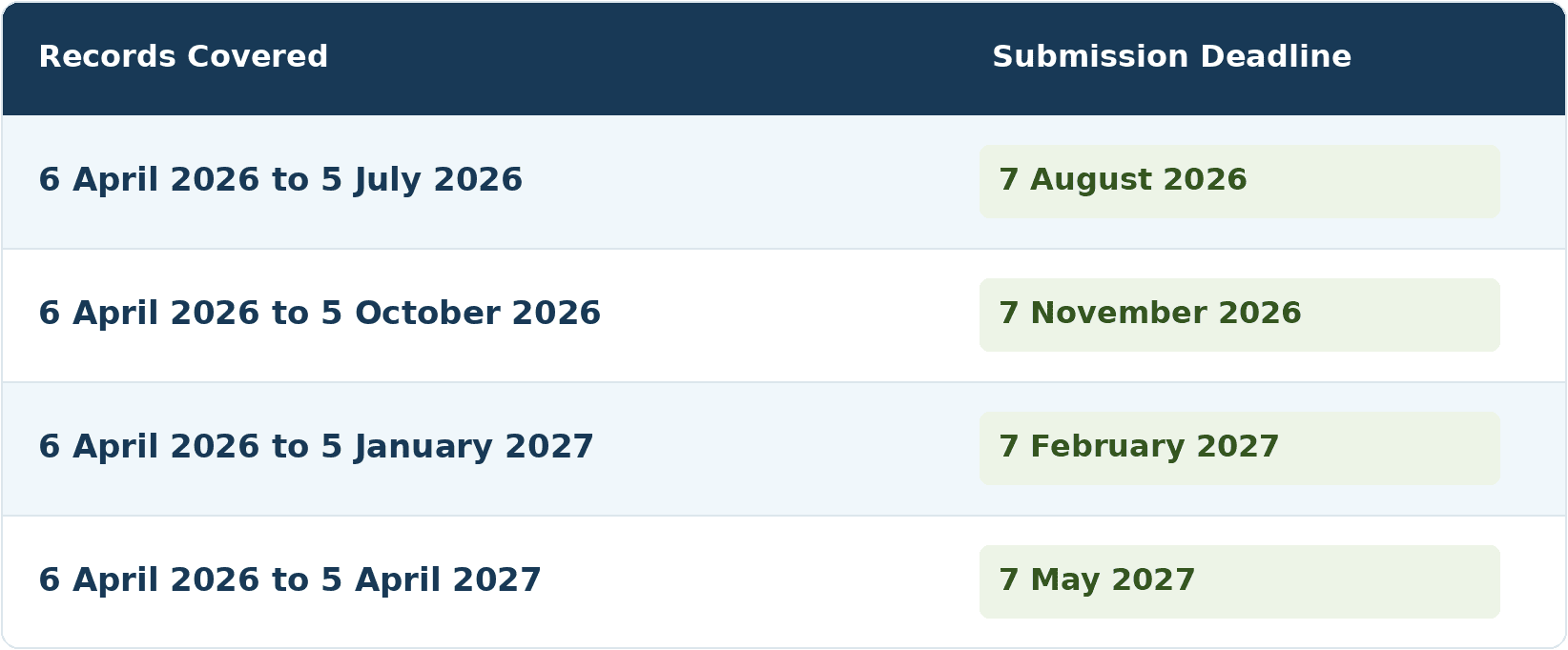
Calendar update periods are also available, using dates from 1 April to 31 March. The submission deadlines remain the same.
You still need to send an update if you had no income or expenses during the latest period. Your software may also provide an estimated tax bill, but that estimate can change as further information and adjustments are added.
What Happens At The End Of The Tax Year?
After the tax year ends, you need to check your records, make relevant adjustments and ensure your return includes your other taxable income and gains.
Earlier MTD guidance referred to a separate End-of-Period Statement, or EOPS. That requirement was removed, so it should no longer be presented as an additional filing you must complete.
Under the current process, you complete and submit your annual tax return through compatible software by 31 January following the end of the tax year. For 2026/27, that deadline is 31 January 2028.
You must also submit the return for the tax year before you enter MTD in the usual way. Someone joining in April 2026 still needs to complete their 2025/26 Self Assessment return, with an online filing deadline of 31 January 2027.
Our accounts and tax return support can help bring your records together and check the information needed for year-end reporting.
Does MTD Mean Paying Tax Every Quarter?
MTD for Income Tax does not introduce compulsory quarterly tax payments. The changes concern your records and reporting, while the existing tax payment dates remain in place.
Your balancing payment is normally due by 31 January following the tax year. If payments on account apply, these are generally due on 31 January and 31 July.
Regular reporting can help you review your figures more often, but you still need to plan for the actual payment deadlines. An estimated bill is useful for budgeting; it should not be treated as your final liability.
Are There Exemptions From MTD?
Some people are exempt from MTD for Income Tax. Partnerships are not currently required to use it, and HMRC has not yet set their start date.
Other exemptions depend on personal circumstances. Digital exclusion may apply where it is not reasonable for someone to use compatible software because of factors such as disability, age, location or religious beliefs.
Being unfamiliar with accounting software is not, on its own, enough to qualify. Some exemptions are automatic, while others require an application to HMRC.
An MTD exemption also does not remove your underlying Self Assessment responsibilities. You must continue reporting your income and gains as required.
What Happens If You Miss An MTD Deadline?
HMRC will not apply penalty points for late quarterly updates for the 2026/27 tax year. You must still keep digital records and send the updates before completing your annual return.
This relaxation does not extend to late annual tax returns or late tax payments.
For mandatory users after 2026/27, missing a quarterly update or annual return deadline can result in a penalty point. Reaching four points triggers a £200 penalty, with further £200 penalties for subsequent missed submission deadlines while at the threshold.
Late payment penalties and interest are separate considerations. If you are behind, checking what is outstanding and arranging the next steps promptly is more useful than waiting until the annual return is due.

How Every Penny Accounts Can Help
Keeping up with MTD involves both choosing suitable software and establishing a workable reporting routine. We can talk through your circumstances and agree the support you need.
That may include:
- Checking your qualifying income and when the requirements apply.
- Helping you choose and set up compatible software.
- Explaining how to keep your digital records organised.
- Supporting bookkeeping and quarterly submissions.
- Preparing year-end adjustments and your annual tax return.
- Setting clear dates for providing records and reviewing information.
We explain what is needed in everyday language, so you understand your responsibilities and the work our team is handling. Whether you want help getting started or ongoing support, the aim is to build a process that fits your business.
Talk To Every Penny Accounts About MTD For ITSA
If you are unsure whether MTD applies to you, start with your latest tax return and a breakdown of your self-employment and rental income. We can help you understand the relevant threshold and discuss what to do next.
If you already need to use MTD but your records or software are not ready, get in touch so we can review your position and agree a practical way forward.
Call 01765 824 991, or email info@everypennyaccounts.co.uk to discuss your MTD reporting and the support you need.
